
AI is narrowing the technology gap between web platforms while increasing the value of exceptional experiences for visitors and publishers.
There is a familiar moment in a website project when the conversation turns from what the organization needs to which technology represents the future. Technology moves quickly, especially in the age of AI, and nobody wants to invest in a platform that will fall behind. That makes “modern” a powerful label in platform decisions. For years, it has steered conversations towards technology that appears to represent the future, rather than technology best suited to the organization and the work it needs to do.
This deserves a closer look.
First, “modern” is misleading. When developers use the term, they often mean a headless CMS such as Payload or Sanity, or a headless website built with Next.js. That overlooks how far established platforms such as WordPress and Drupal have come. Worse still, the comparison is often made against an outdated idea of how those platforms are built and operated.
A modern website should be fast, accessible, secure, and rewarding to use. It should also give the people responsible for its content an excellent place to work. Choosing a particular stack does not guarantee any of those qualities. They come from the design, implementation, infrastructure, and working practices around it. Treating headless as the next generation of web development confuses “a different architecture” with “a more advanced one”. And as AI helps developers build sophisticated features across a wider range of platforms, the technical gap that once seemed to favour one approach over another is narrowing.
Modern isn’t a platform.
Most organizations want something fairly reasonable from their website. Visitors should find what they need, understand it, and be able to act on it. The people managing the site should be able to publish useful content, respond to changing priorities, and improve the experience without turning every request into a development project.
Those expectations can lead to quite sophisticated work. An accessible resource library, a useful search experience, or a campaign page that connects properly with your CRM all require care. But none of them tells you, on its own, which content management system you should use.
This is where platform conversations often get ahead of themselves. A list of technologies begins to stand in for an explanation of how the website will work. Familiar names carry associations: WordPress sounds established, React sounds modern, and headless sounds like something with room to grow. Before long, those associations start doing the work that a proper comparison should have done.
It helps to untangle the terms. WordPress and Payload are content management systems. React is a library for building interfaces, and Next.js is a framework for building applications with React. Headless describes an arrangement in which content management is separated from the layer that presents that content. Composable describes an approach to assembling capabilities from separate services. These terms describe different parts of a solution, and they can overlap. Payload itself is built on Next.js.1
None is a quality rating. A headless website can be beautifully engineered or frustratingly slow. A WordPress website can be thoughtfully designed and easy to maintain, or weighed down by years of poor decisions. The architecture creates possibilities and responsibilities. The team still has to turn those possibilities into a good website.
AI makes that distinction more relevant. Developers have more help writing integrations, building interfaces, understanding unfamiliar code, and automating repetitive work. Some features that once demanded a larger budget are becoming more practical across a wider range of platforms. That does not make the platforms interchangeable. It does make “we need a modern stack to build something sophisticated” a claim that deserves a specific explanation.
The useful question is what the proposed architecture will make better for your organization, and what it will ask of you in return.
Headless is a bit of a letdown.
Let’s be honest: headless architecture has been something of a letdown.
For much of the past decade, headless was presented as the future of web architecture: faster websites, greater flexibility, better developer tools, and a foundation ready for whatever came next. This was not a fringe idea either. Lots of platforms were built around the promise of content that could travel freely between websites, applications, devices, and services.2
The message reached well beyond the CMS vendors themselves. In the world of WordPress, WP Engine launched Atlas under the banner “the future of headless WordPress.” Pantheon developed decoupled tools and starter kits for WordPress and Drupal using frameworks such as Next.js and Gatsby. Frontity, a React framework created specifically for decoupled WordPress, was acquired by Automattic in 2021. Headless had real momentum because the promise was appealing.3
Give developers freedom to build the front end with the tools they prefer. Store content independently so it can be used wherever it is needed. Let separate applications develop on their own schedules. For organizations with several digital products, that separation can be genuinely useful.
But the argument gradually expanded beyond those use cases. Separating content management from presentation came to be treated as an upgrade in itself, and as the sensible destination for almost any ambitious website. This was a “modern” approach.
And that is where the hype fell flat. Headless does solve certain engineering problems, but it doesn’t solve many of the problems most marketing and communications teams have with their websites.
A communications manager still needs to see how a page will look, rearrange a campaign, add a useful call to action, and publish on time. A visitor still needs a fast, accessible page with useful information. An executive director still needs a website the organization can afford to operate and improve. Moving content through an API does not, by itself, make any of that easier.
In some projects, the separation creates work that an integrated CMS already handles. Previewing unpublished content, connecting an editor’s changes to the finished page, coordinating releases, and keeping cached content current all need deliberate solutions. The development team gains more control over the front end, but the organization must then pay for the experience around it.
This is the letdown: an architectural choice acquired a reputation for being an upgrade before its benefits to the organization had been demonstrated. Headless found real uses, but it never became a convincing default for the ordinary organization website.
Meanwhile, WordPress kept evolving. Its editor became more capable. Hosting and deployment practices improved. Developers gained better tools for building custom experiences. The comparison that made headless look inevitable often depended on WordPress standing still, and it did not. Not even close.
Now AI is making sophisticated development more accessible across established platforms, too. A team can spend its effort improving an already capable publishing system instead of assuming that progress requires replacing it. That changes the calculation again.
Headless can still be the right architecture. But “being headless” deserves far less weight than the publishing experience, flexibility, cost, support, and day-to-day usefulness of the finished website. Those are the qualities an organization will actually live with.
WordPress’ evolution is impressive.
If your impression of WordPress comes from a site built ten years ago, a page builder that became difficult to manage, or a collection of plugins nobody fully understood, it is worth taking another look. Those experiences are real. They are also a poor description of what a carefully built WordPress website can be today.
Modern WordPress supports a visual block editor, reusable design patterns, custom content types, APIs, and interactive components. Developers can build a tailored theme around an organization’s design system, define how content is organized, and connect the site to external services. WordPress can also provide content to a separate front end when that arrangement serves a purpose.4
PHP has evolved, too.
The same dated assumptions often follow PHP, the language behind WordPress. PHP 8 introduced features such as union types, named arguments, attributes, and more concise ways to express common programming tasks. Together with features introduced in earlier releases, modern PHP gives developers useful tools for organizing code, describing the data it expects, and catching mistakes.5
You do not need to recognize those terms to understand their significance. PHP is an actively developed programming language with many of the capabilities engineers expect from other contemporary languages. It can support well-organized, tested application code. Writing in PHP does not oblige a developer to work as though it were 2005.
PHP normally runs on the server. It processes a request and generates a response, often the HTML a browser displays. JavaScript can run on a server, too, through environments such as Node.js. Modern Next.js applications can render work on the server and send selected interactive components to the browser. The choice is more nuanced than an old-fashioned server language versus a modern browser language.6
PHP also remains widely used. W3Techs identifies it on roughly seven in ten websites whose server-side programming language it can detect. That is a measure of websites in its survey, rather than a share of all internet activity, but it gives some perspective on claims that PHP has been left behind.7
Good engineering matters more than the language label.
A secure, reliable WordPress site is entirely achievable. It depends on sensible access controls, timely updates, reviewed code, backups, monitoring, and a manageable set of dependencies. WordPress’s own hardening guidance covers these responsibilities in detail.8
Headless changes where some risks sit. A public front end may be isolated from the CMS, which can be useful. The CMS, APIs, authentication, build process, and software packages still need to be secured and maintained. A smaller plugin directory or a newer language does not settle that work for you.9
The same principle applies to speed and accessibility. Sending less unnecessary code, serving appropriately sized images, using good caching, and building interfaces properly matter across platforms. A fast demo or a framework logo cannot substitute for checking the pages people will actually use.
Gutenberg makes publishing easier.
The publishing experience is one of the strongest reasons to choose WordPress, and it deserves more attention than it usually gets in an architecture discussion.
Gutenberg, the WordPress block editor, lets people work with content in a visual setting. Text, images, calls to action, resource lists, and other elements can become reusable parts of a page. With a well-built theme, those parts reflect the organization’s design rather than asking editors to invent a layout each time they publish.10
Consider a communications team preparing a new program launch. They need a landing page, supporting resources, a quote from a partner, a registration link, and a prominent notice on a related page. Much of that work should be routine publishing. It should not require a developer to wire together a new page every time.
In a carefully designed WordPress editor, the team can start with an appropriate page pattern, add the content, choose from the components the project provides, and review the result. The design work has already happened. The team can concentrate on the message.
Freedom to publish, with the design protected.
Giving editors control does not mean handing them an unrestricted design tool. WordPress supports curated blocks, reusable patterns, and controls that restrict which elements people can move or change. Content-only editing can let someone revise the message while keeping the surrounding design intact.11
That combination is valuable. A communications team gets useful freedom. The organization gets consistency. Developers can reserve complex behaviour for purpose-built components instead of making every page a special case.
The quality of this experience depends on the implementation. An editor crowded with overlapping plugins and poorly named blocks can be just as frustrating as any other badly designed system. We favour a deliberate set of native blocks and patterns, useful defaults, and controls that match the work people need to do.
Familiarity also has practical value. A team member who has used WordPress elsewhere starts with some understanding of how publishing works. Documentation, training materials, and potential support providers are readily available. A custom implementation still needs a proper handover, but the organization is building on a shared foundation.
The useful comparison is the actual editor your team will receive. Ask to build a representative page, change its layout, preview it, and publish it. Find out which parts require custom development or an additional product. The everyday usefulness of a publishing system is much easier to judge when the people who will use it can try their own work.
Modern infrastructure changes the comparison.
One of the easiest ways to make WordPress look outdated is to compare an inexpensive, poorly maintained WordPress installation with a carefully engineered Payload or other headless implementation. The difference may be dramatic, but it tells you very little about what caused it.
Payload’s own “Payload vs. WordPress” page is a useful example. It invites readers to “leave yesterday’s technology in the past” and contrasts Payload’s modern, purpose-built platform with a version of WordPress defined by plugins, outdated PHP, and a cluttered dashboard. That is effective product marketing. It is not a fair architectural comparison.12
A fair comparison puts a well-engineered Payload implementation beside a well-engineered WordPress implementation: current PHP, a purpose-built theme and block system, managed infrastructure, a disciplined deployment workflow, and a deliberately curated set of dependencies. At that point, the question is no longer which platform appears newer. It is which approach creates more value for the organization.
Traditional WordPress: one application handles the website.
In a conventional WordPress setup, editors manage content in WordPress, and WordPress uses the theme to generate the pages visitors see. Content lives in the database, uploaded media lives in file storage, and the application brings those pieces together.
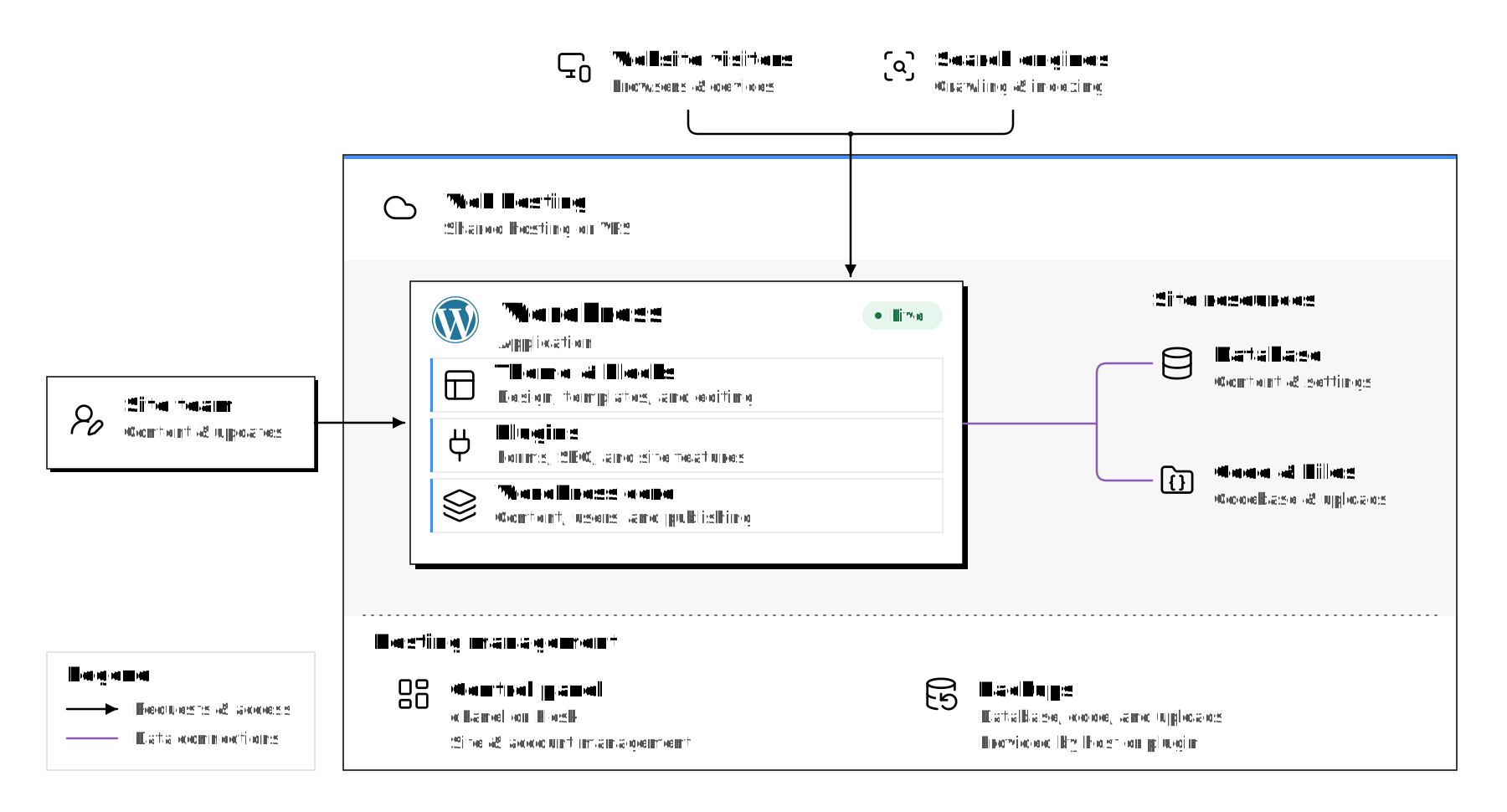
Diagram explained
Website visitors and search engines reach one WordPress application on shared hosting or a VPS. The application combines the theme and blocks, plugins, and WordPress core.
The same hosting account contains the database, codebase, and uploaded media. These resources connect directly to the WordPress application.
The site team manages content and updates through WordPress. Hosting administration uses a control panel such as cPanel or Plesk, with backups provided by the host or a plugin. Backup scope and restore arrangements depend on that configuration.
This arrangement is relatively direct. The system that manages the content also understands how it will appear on the website. Publishing and previewing can happen within the same application. Developers have fewer connections between separate systems to build and maintain.
A basic installation might sit on a single hosting account with updates made directly to the live site. That is a choice about how the site is operated. It is not a requirement of WordPress, and it is a poor basis for judging every website built with it.
Modern WordPress: one publishing system, with modern deployment.
In a setup such as the one we build around Pantheon, WordPress still manages content and produces the website. The development process around it is more disciplined. Code is tracked in version control, reviewed, checked, and moved through development and testing environments before it reaches the live site.
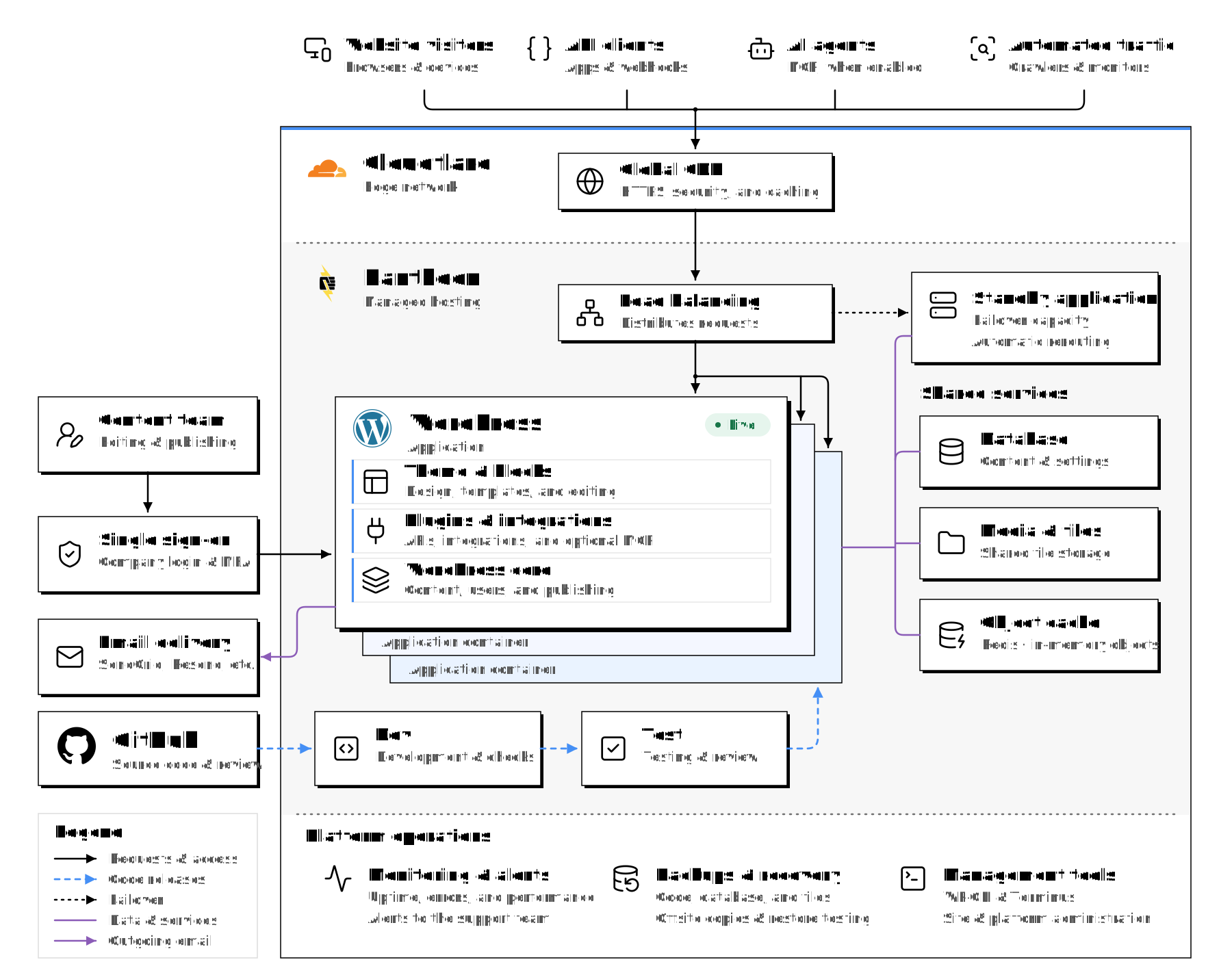
Diagram explained
Visitor requests pass through Cloudflare to Pantheon load balancing and the WordPress application. The diagram also shows API clients, optional MCP-connected AI agents, and automated traffic.
The WordPress application uses shared database, media storage, and Redis services within the hosting boundary. Standby application capacity provides application failover; the illustration does not imply a multi-region disaster recovery arrangement.
The content team accesses WordPress through configured single sign-on and multi-factor authentication. An external email provider handles outbound email from the application.
Code moves from GitHub through Dev and Test before reaching Live. Supporting operations include monitoring, backups and restore checks, WP-CLI, and Terminus. Availability depends on the hosting plan, integrations, and team configuration.
This is where CI/CD belongs in the discussion. The initials refer to continuous integration and continuous delivery or deployment. In practical terms, changes can be checked and prepared through a repeatable process, with automation handling appropriate steps and people reviewing the work where needed. A marketing team does not need to know the mechanics to benefit from safer releases and fewer surprises.
Content publishing remains a separate activity. Editors work on the live content, while developers test code changes elsewhere. Pantheon’s workflow moves code towards Live and brings copies of live content back to development and testing. A routine code release should not replace the production database with an older testing copy.13
A content delivery network, or CDN, can serve cached responses from locations closer to visitors, reducing the work the application has to do for eligible requests. Pantheon provides a Global CDN as part of its platform. Caching still needs to be configured around the website’s behaviour, particularly for private or personalized content.14
The important point is that WordPress can have a mature development and delivery process while retaining an integrated publishing experience. Git, automated checks, separate environments, caching, and repeatable releases are available without replacing the CMS.
Headless: content management and presentation are separated.
In a headless arrangement, the CMS provides content to a separate presentation layer. That layer might be a Next.js website, a mobile application, or several different products. Developers decide how each one retrieves content and turns it into an experience.
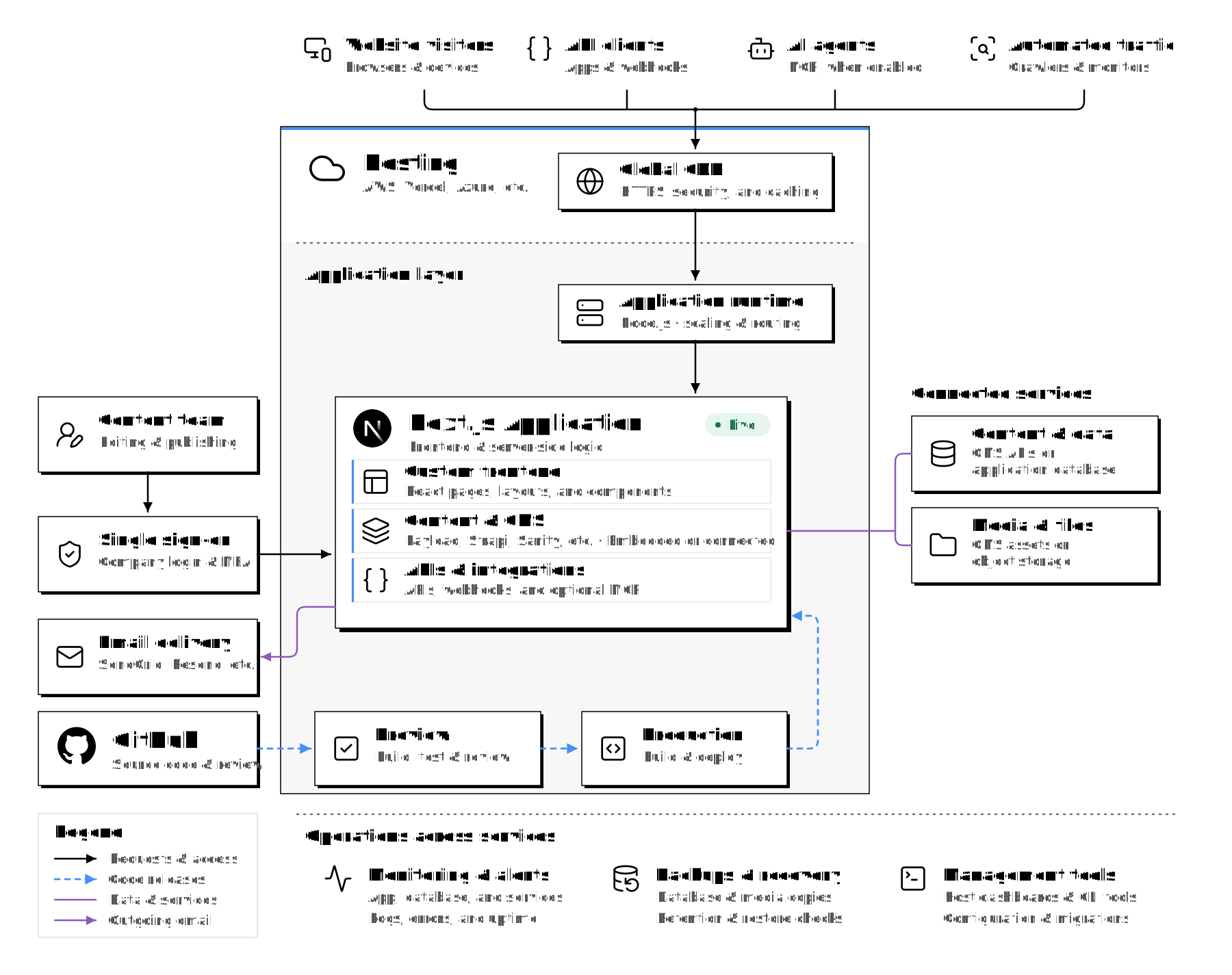
Diagram explained
Website visitors, API clients, optional AI agents, and automated traffic reach a Next.js application through a hosting provider’s CDN. The application runtime handles Node.js scaling and routing.
The Next.js application combines a custom React frontend with a CMS, such as Payload, Strapi, or Sanity, and project-specific APIs and integrations. The CMS may be embedded or connected; content may come from CMS APIs or an application database.
Media is supplied by CMS assets or object storage. The content team accesses publishing tools through configured single sign-on and multi-factor authentication, while an external email provider handles outbound email.
GitHub supplies the code for preview builds and production deployments. Monitoring, backups, restore checks, dashboards, and command-line tools span the application and its connected services. The exact responsibilities depend on the hosting providers, CMS, and project configuration.
That is a meaningful architectural difference, but it is not a different universe from modern WordPress. A WordPress site can also use version control, automated testing, CI/CD, managed hosting, caching, APIs, and separate development, staging, and production environments. Both approaches require decisions about previews, authentication, releases, caching, and what happens when something fails.
The main difference is where the presentation layer lives and who is responsible for connecting it to the publishing experience. In headless, that connection is usually custom-built and maintained as part of the application. In WordPress, much more of it is available within the publishing system from the start. The trade-off is not modern versus traditional. It is added architectural freedom versus the cost and responsibility that come with it.
Speed comes from the whole implementation.
Headless can produce very fast websites. So can WordPress. In each case, the result depends on how pages are rendered, what is cached, the amount of work sent to the browser, and the quality of the assets and code.
A framework does not make a heavy page lightweight. A CDN does not fix an inaccessible form. A modern hosting provider does not decide whether a visitor can find the information they came for.
Compare representative pages under comparable conditions. Look at real visitor measurements where they are available, including Core Web Vitals, which assess loading, responsiveness, and visual stability. Then look beyond the score to the actual experience: search, navigation, forms, accessibility, and how the website behaves when something goes wrong.15
The real cost is what it takes to keep improving.
The build price is only the beginning of a website’s cost. The organization will also pay for hosting, maintenance, support, training, integrations, and the changes that follow launch. Some of those costs arrive as invoices. Others arrive as staff time or work the team decides it cannot afford to do.
This is where a good publishing system earns its place. If a communications team can build the next campaign from existing components, the organization avoids paying someone to reproduce work the website should already support. If changing a page requires a specialist, a small request can acquire a briefing, estimate, scheduling delay, review, and invoice.
WordPress often gives content-heavy websites an economic advantage because much of the required publishing machinery already exists. A project can put more of its budget into content, design, accessibility, and the features that are particular to the organization. Familiar tools and a broad supplier community can also make ongoing support easier to source.
That advantage has to be protected. Cheap hosting, excessive plugins, and hurried development can create an expensive WordPress website to operate. A disciplined headless implementation can be economical when its separation solves a real problem or fits an existing development team. The useful comparison is between credible implementations and their ongoing responsibilities.
A proposal should make those responsibilities visible. Who maintains the front end? Who maintains the CMS? What happens when an integration changes? Which editor features are included, and which require additional development or licensing? How much can the communications team accomplish within the system it is buying?
AI can reduce some implementation work, but it does not remove ownership. Generated code still needs to be understood, reviewed, tested, and maintained. Research into AI-assisted development continues to show that the results depend heavily on the task, the team, and the surrounding workflow.16
For an organization buying a website, the relevant saving is the cost of delivering and maintaining useful improvements. A developer producing more code is only helpful if that code makes the website better without creating a larger maintenance burden.
Owning the code should give you choices.
Vendor lock-in is often discussed as though it begins and ends with the software licence. In practice, an organization can own its source code and still find itself dependent on the only supplier who understands it.
That dependence can come from a proprietary service, an unusual combination of tools, undocumented deployment steps, or a custom content model that is difficult to move. It can also come from ordinary things: the agency owns the hosting account, nobody else has the repository, or the handover never happened.
Open-source software provides a useful starting point. WordPress and Payload are both open source, so this is not a distinction that automatically favours one of them. The more revealing questions concern the complete solution and how easily another capable team could take responsibility for it.17
WordPress’s broad community is a practical strength here. There are established conventions, public documentation, hosting options, and many people who work with the platform. A site built close to those conventions is generally easier to hand over than one whose essential behaviour lives in an unfamiliar layer of custom machinery.18
There are limits to that advantage. A proprietary page builder can create its own migration problem. A deeply customized plugin can become a single point of dependence. A WordPress site built on a managed platform may still require work to move its deployment and caching arrangements elsewhere.
Headless can introduce similar dependencies through the CMS, front-end framework, hosting services, preview tools, and integrations. Even when the application can be self-hosted, operating it well may require knowledge of details such as coordinating caches across multiple instances.19
The goal is a website the organization can understand, maintain, and move when necessary. Keep ownership of the accounts and code explicit. Expect documentation and a usable handover. Ask what a change of supplier or hosting provider would actually involve. Those answers tell you more about independence than an “open source” badge on its own.
Can your website keep up?
For marketing and communications teams, it can feel as though everything is moving faster. There are more channels to support, more expectations to meet, and less time between an idea and the moment it needs to reach an audience. AI is making it easier to develop concepts, explore alternatives, and prepare work. A website that turns every useful change into a queue of development requests can quickly become the part that holds everything else back.
This is where velocity becomes a useful way to think about a platform. Can your team take an idea, turn it into something useful, publish it, learn from the response, and improve it while the opportunity is still there?
That depends on more than development speed. Content has to be written, reviewed, and published, and some changes need design or code. Every unnecessary handoff adds time. A website has real velocity when the team can make ordinary improvements while they still matter.20
The time between an idea and a useful result.
Imagine your team identifies a gap in how the website explains an important service. The content is ready, the design system already provides what is needed, and someone is available to publish it. If the CMS makes that a straightforward task, the improvement can happen while the problem is fresh.
Now imagine the same change requires a new front-end component, a developer’s availability, and a scheduled release. There may be good reasons for that process when the behaviour is new. It is a costly dependency when the team is simply trying to assemble content from patterns the website already uses.
These small differences accumulate. A team that can act on what it learns has more opportunities to improve its work. A team that has to justify a development request for every adjustment will naturally leave some useful ideas undone.
This is one of the strongest arguments for a well-built Gutenberg experience. Developers create the capabilities and guardrails. Editors use them independently. The website can continue to improve through routine publishing, with development effort available for changes that actually need it.
AI should shorten the path to publishing.
AI can help a development team prototype a component, explore an integration, or work through a difficult implementation. On WordPress, that work can become a reusable block or feature that the communications team then uses without further developer involvement.
That is a more useful form of progress than making it slightly faster to complete an endless stream of small requests. The value carries forward each time someone uses the capability. A better resource filter, a flexible campaign pattern, or a well-designed notice component can support many future changes.
The same discipline matters when AI helps produce content. More drafts and ideas are of limited use if the publishing process cannot accommodate them. People still need to check accuracy, make editorial decisions, and review accessibility. The platform should make that work easier and help the team get the finished result out the door.
Velocity does not mean abandoning review. It means giving each kind of change an appropriate path. A correction to an opening-hours notice should be simple. A change to authentication deserves engineering review. A good website makes those differences manageable rather than sending every request through the same expensive process.
You can evaluate this without an elaborate measurement system. Look at how long ordinary publishing tasks take, how often they need a developer, how much work waits for a release, and how often a change needs to be corrected afterwards. Ask the team where it loses time. Those answers will reveal whether the platform is helping it keep up.
When headless earns its place.
There are projects where separating content management from presentation provides a real advantage. An organization may need to deliver the same content to a website, a mobile application, and other products, each with different release schedules. It may have an established application team and a front end that behaves more like software than a collection of published pages.
In those circumstances, an API-first CMS and a framework such as Next.js can fit the work well. A platform such as Payload gives developers considerable control over content models, access rules, and application behaviour. Teams that need that control may reasonably accept the additional integration and operating responsibilities.
The justification should be specific. Publishing a website and sharing its articles on social media does not, on its own, create the same need as supplying content to several independently developed applications. A custom search, an interactive tool, or a CRM integration does not automatically require replacing WordPress either. WordPress has APIs and can participate in a wider application architecture.21
Drupal deserves the same fair treatment. Its content modelling and editorial workflow tools can suit organizations with demanding requirements. That is a reason to examine those capabilities against the work, rather than treating its reputation as evidence that it must be a better choice for every complex organization.22
Enterprise requirements belong in the comparison too. Permissions, sign-on, approval workflows, auditability, and recovery need concrete answers in any proposed solution. Some are provided by the CMS, some by additional software, and some by the hosting and operating arrangements. An architecture diagram cannot establish that those requirements have been met.
The decision becomes much easier to defend when the team can explain which requirement the separation solves, demonstrate the publishing experience, and account for the ongoing cost. That is a sound engineering case for headless. A general desire to look more modern is a much weaker one.
Build for the work ahead.
The most revealing platform comparison is a demonstration of the work your organization expects to do.
Give each proposed solution the same task. Ask the team to create a campaign page, update a resource, preview a change, handle an approval, and explain how it reaches the live site. Look at what happens when the request goes beyond the original template. Include the people who will publish the content and the people who will maintain the system.
Then compare the experience, the responsibilities, and the cost. How much freedom does the organization get? Where will it need specialist help? What has been built already, and what is still a promise? What would it take for another supplier to support the website a few years from now?
This is why we build WordPress websites around a considered publishing experience and a modern development process. We favour native blocks, reusable patterns, purpose-built features, a carefully chosen set of plugins, and infrastructure that supports testing and reliable releases. The aim is to make the website capable enough for the organization’s ambitions and practical enough for its everyday work.
There is room for sophisticated engineering in that approach. It belongs in the places where it produces something useful: a better search, a dependable integration, a faster page, an accessible interaction, or an editor that gives a communications team more control.
AI is widening what development teams can accomplish. WordPress benefits from that progress alongside other platforms, while bringing a mature publishing system, a large community, and an established support ecosystem to the project.
A platform earns its place by helping an organization do better work. As the technical possibilities expand, the experience of using the website and the ability to keep improving it become even more valuable. That is where a modern website should prove itself.
References checked on 27 September 2026.
- Payload, “What is Payload?,” accessed 27 September 2026. Describes Payload as an open-source CMS and application framework built with Next.js. ↩︎
- DrupalCon Barcelona 2015, “Introduction to Headless Drupal”; Contentful, “Announcing our Series D funding.” These provide historical context for the broader headless market and its API-first approach to content delivery. ↩︎
- WP Engine, “WP Engine Launches Atlas, the Future of Headless WordPress”; Pantheon, “Decoupled Kit Overview”; Frontity, “Frontity is joining Automattic.” ↩︎
- WordPress, “Registering Custom Post Types”, “REST API Handbook”, and “Interactivity API Reference”. ↩︎
- PHP, “PHP 8.0 release announcement” and “Type declarations”. Modern language features help developers express and check application behaviour; their presence does not guarantee code quality. ↩︎
- PHP, “What is PHP?”; Node.js, “Introduction to Node.js”; Next.js, “Server and Client Components.” ↩︎
- W3Techs, “PHP usage statistics”, report dated 26 September 2026: 69.9% of websites whose server-side programming language W3Techs identifies. The percentage changes over time and does not measure all websites, applications, or internet traffic. ↩︎
- WordPress, “Hardening WordPress”. ↩︎
- OWASP, “A03:2025 Software Supply Chain Failures”. Covers risks associated with software dependencies and development infrastructure across technology stacks. ↩︎
- WordPress, “Curating the Editor Experience” and “Patterns”. ↩︎
- WordPress, “Block Locking API”. Includes layout controls and content-only editing. ↩︎
- Payload, “Compare Payload to WordPress,” accessed 27 September 2026. The cited language appears on Payload’s own comparison page; this article assesses the framing, rather than presenting it as an independent evaluation. ↩︎
- Pantheon, “Pantheon WebOps Workflow”. Documents how code and content move between environments. WordPress also provides development, build, lint, and test tooling. ↩︎
- Pantheon, “Global CDN”. Describes the request path, page caching, and cache expiration. ↩︎
- Google, “Web Vitals”. Covers loading, responsiveness, visual stability, and the role of field measurements. ↩︎
- DORA, “Balancing AI tensions: Moving from AI adoption to effective SDLC use”; METR, “We are Changing our Developer Productivity Experiment Design”, 24 February 2026. These discuss development productivity and research limitations. The article’s argument about AI narrowing practical development gaps is our assessment, rather than a measured claim of platform parity or guaranteed savings. ↩︎
- WordPress, “GNU Public License”; Payload, “official source repository and MIT licence.” Commercial services and enterprise features may have separate terms. ↩︎
- WordPress, “Make WordPress”. Public teams and resources support development, documentation, training, and the wider project. ↩︎
- Next.js, “Self-Hosting.” Includes cache configuration and coordination across multiple application instances. ↩︎
- Pantheon, “WebOps: maximize value by driving velocity”. The discussion applies Pantheon’s emphasis on cross-functional teams, continuous improvement, and faster delivery of useful website changes. ↩︎
- WordPress, “REST API Handbook”. ↩︎
- Drupal, “Content moderation module.” Documents editorial states and workflows. ↩︎